I've configured GDPR for subscriptions, but the link to Privacy Policy page is not redirecting to the correct page. How to fix?
To set up the redirects correctly, go to Content → Pages, select the desired page from the list (where the customer should be redirected) and copy the value of the URL Key setting in the Search Engine Optimization section.
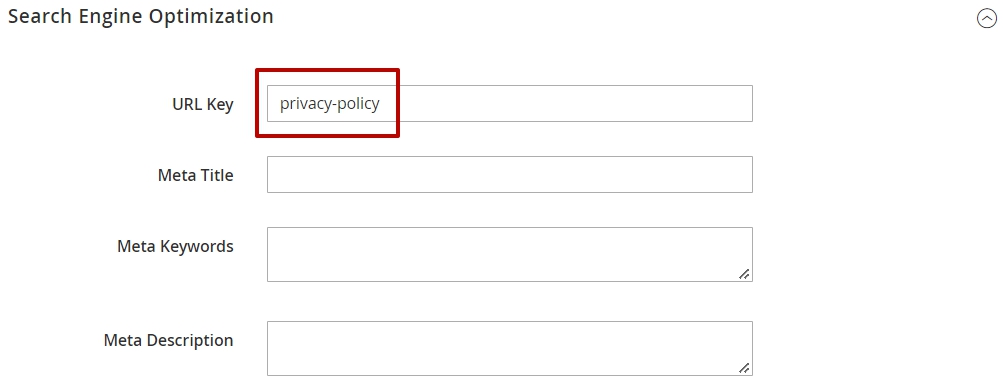
This URL Key value should be used as <href> attribute for the link in Stores → Configuration → Amasty Extensions → Out of Stock Notification → GDPR Consent → Consent Text.
Related Articles
How to translate the privacy policy text?
The extension doesn’t allow for editing the existing privacy policy once it has been submitted in the Enabled/Disabled status. To translate the existing policy, proceed to Magento Admin Panel → Customers → Privacy policy, choose the required policy ...Is your GDPR module compatible with Global Privacy Control (GPC)?
Since v. 2.18.0 of the GDPR Pro and the GDPR Premium packages, it is possible to use the Global Privacy Control (GPC) functionality. You can find the 'amasty/module-gdpr-gpc' package for installing in composer suggest. The feature is available as ...Is it possible to hide the out of stock subscription block for specific products?
Yes, there's an option to hide the stock alert block for particular products. To achieve that, follow the steps below. Step 1. Navigate to Catalog → Products. Step 2. Pick the product you wish to hide the Stock Alert block for and open its ...What is the difference between CCPA and GDPR?
The CCPA and GDPR modules look similar, however, there are certain nuances to both of them due to them being tailored for two different laws. While both of them allow you to create multiple checkboxes, and your customers — to download their data and ...GDPR API
We have created a public API collection for GDPR module with all available queries and sample data that you can both test via our demo endpoints and copy to run local tests in your Magento environment. More details about using public collections can ...
Announcements
⚡ Have you enlarged the functionality of the Amasty extension with your own code? Share your improvements with us!
At Amasty, we understand that some of our clients require customized features to perfectly align the extension with their business needs. If you have developed new functionality within an Amasty module and would like to share it, please submit a ticket