How to move manually installed extension to Composer?
To switch to module installation via Composer, it is necessary to remove module package(s) from the app/code/Amasty directory and install them from scratch into the vendor/amasty directory using Composer. Such process only moves extension files from one location to another and doesn't affect module settings or gathered data.
Follow the steps below to do that:
Follow the steps below to do that:
Step 1. Create backups of your database and root Magento directory;
Step 2. If you have any customizations or fix patches for the package you're about to move that are applied from root Magento directory and are adapted for the app/code/Amasty file path, edit those patches and change file paths inside them to corresponding vendor/amasty package path. For example, this is how file paths in the patch look like before: And this is how they should look after the change:
  To find out what directory name should be used in patches' file path after vendor/amasty, inspect composer.json file inside the module package that is changed by the patch: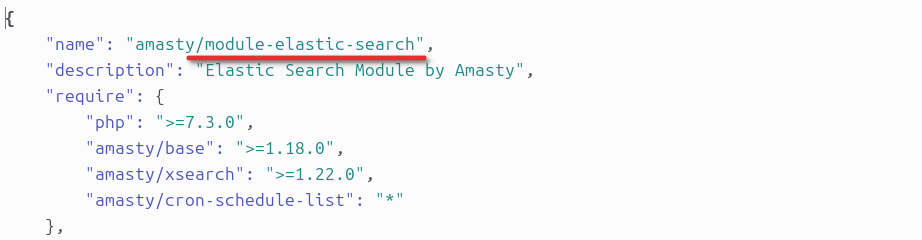
Step 2. If you have any customizations or fix patches for the package you're about to move that are applied from root Magento directory and are adapted for the app/code/Amasty file path, edit those patches and change file paths inside them to corresponding vendor/amasty package path. For example, this is how file paths in the patch look like before:

If your patches are applied directly from module directory rather than from root Magento directory, file paths inside them don't need to be changed.
Step 3. Remove extension package(s) from app/code/Amasty directory using the command below, replacing <Name> with the actual name of the package you're moving:
rm -rf app/code/Amasty/<Name>

In case you've never used Composer to install Amasty extensions before, make sure that you're also removing the Amasty/Base package together with the main packages, as it will be automatically installed via Composer with any Amasty extension.
Step 4. Install extensions from scratch using Composer, following our official guide. During this step, you might come across the following error:
"Autoload error: Module 'Amasty_<Name> from '/app/code/Amasty/<Name>' has been already defined in '/vendor/amasty/<name>'"
It means that the same extension is installed at app/code/Amasty and at vendor/amasty, which is not allowed by Magento. Remove the package mentioned in the error message from app/code/Amasty to successfully execute Magento commands;
Step 5. Once installation is finished, re-apply patches for the installed packages, if you have any, according to the following article.