Can I change the edition (CE/EE/Cloud) of my extension?
Community, Enterprise and Magento Cloud module editions are different solutions, as each of them is developed and tested according to the peculiarities of the corresponding Magento edition. In this situation, it is important to ensure that the module edition that you purchased matches the edition of your Magento environment.
In case you need to upgrade your current edition, such action is now available in customer account at Subscriptions tab.

The option is available for edition upgrade only, and applies to Product Subscriptions. For more details on edition downgrade, or changing editions for modules purchased before February 1st, 2022, please contact our team, and we will advise on further steps.
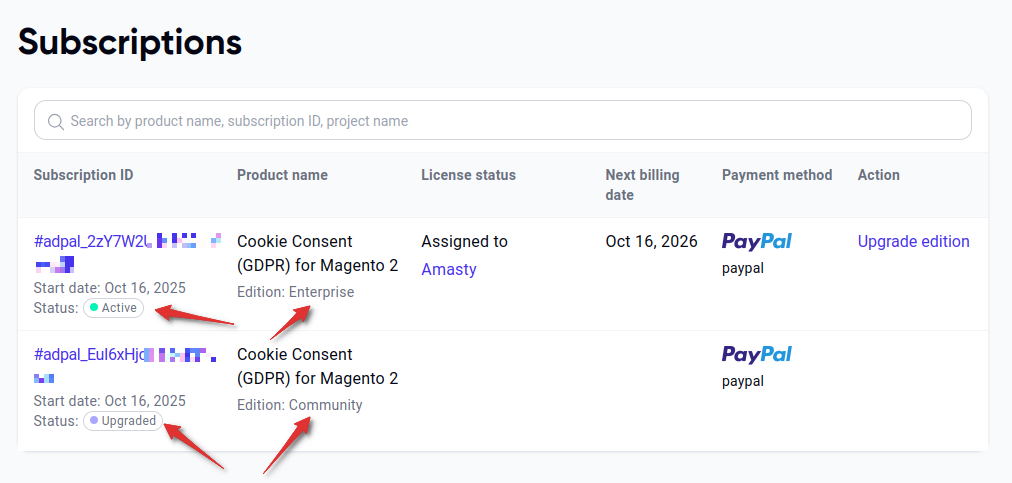
Select the module that you want to upgrade, and click on Upgrade Edition link next to it:
Choose the new edition that you'd like to obtain:
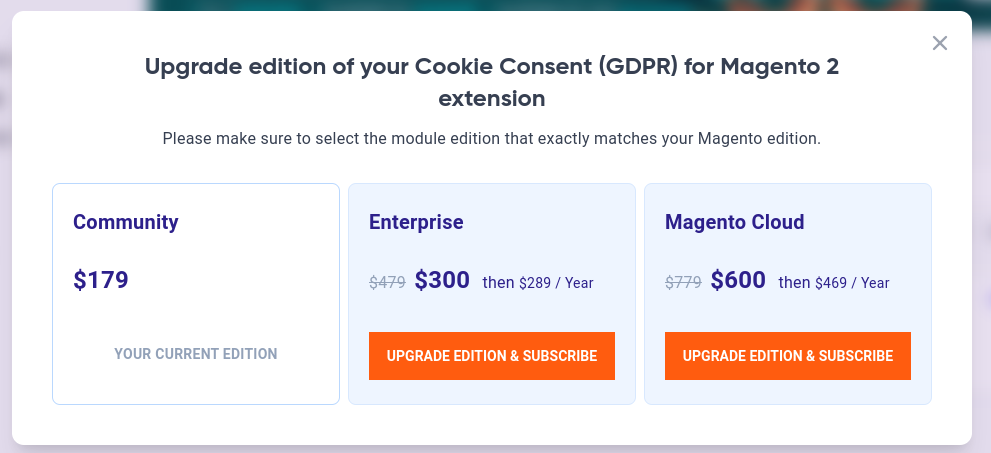
A corresponding product will be added to your cart. Its cost will be the difference between new edition price and the price for the old edition you've already paid:
Finish the upgrade by placing an order with this product. You can verify that the upgrade has been successful by checking the new edition at Subscriptions tab. The subscription for old edition will also be marked as Upgraded: